Editor's Note: As OpenAI's GPT Images 2.0 capability matures, image generation is transitioning from "one-time output" to "systematic production." However, in practical use, the difference between different users lies not in the tool itself, but in whether they have mastered a clear and reusable methodology.
This article is a practical guide. From storyboard narration and character systems to marketing material generation, it systematically breaks down the core usage of GPT Images 2.0 and summarizes a set of universal tips, structure, and workflow, including character anchors, editing protocols, and quality stratification, among other key techniques. Let each generation serve a clear output goal.
Below is the original text:
I have consolidated the experiences of all AI geeks, design geeks, prompt experts, and GPT image players into the ultimate guide on GPT Images 2.0, helping you go from beginner to expert.
Storyboard scripts, character sheets, product prototypes, social media campaigns, UI concept designs, infographics, and more—everything can be achieved using GPT Images 2.0.
Beginners often treat it as a stronger Midjourney, using it to "help me create a cooler comic character," while professional users build a complete workflow around it and refine reusable "anchors."
Use Cases
Next, let me show you where GPT Images 2.0 truly shines:
1. Visual Storytelling
OpenAI's official examples have already demonstrated this point: whether it's comic storyboards, storytelling breakdowns, or rhythmically paced comics, it can all be done well.
This has almost overturned the traditional production process, such as:
· Anime storyboards with consistent characters
· More engaging social media carousel content
· Video scripts broken down frame by frame
· Comics with clear rhythm and strong readability
Tasks that used to require multiple tools to collaborate on can now be generated directly within the same system.
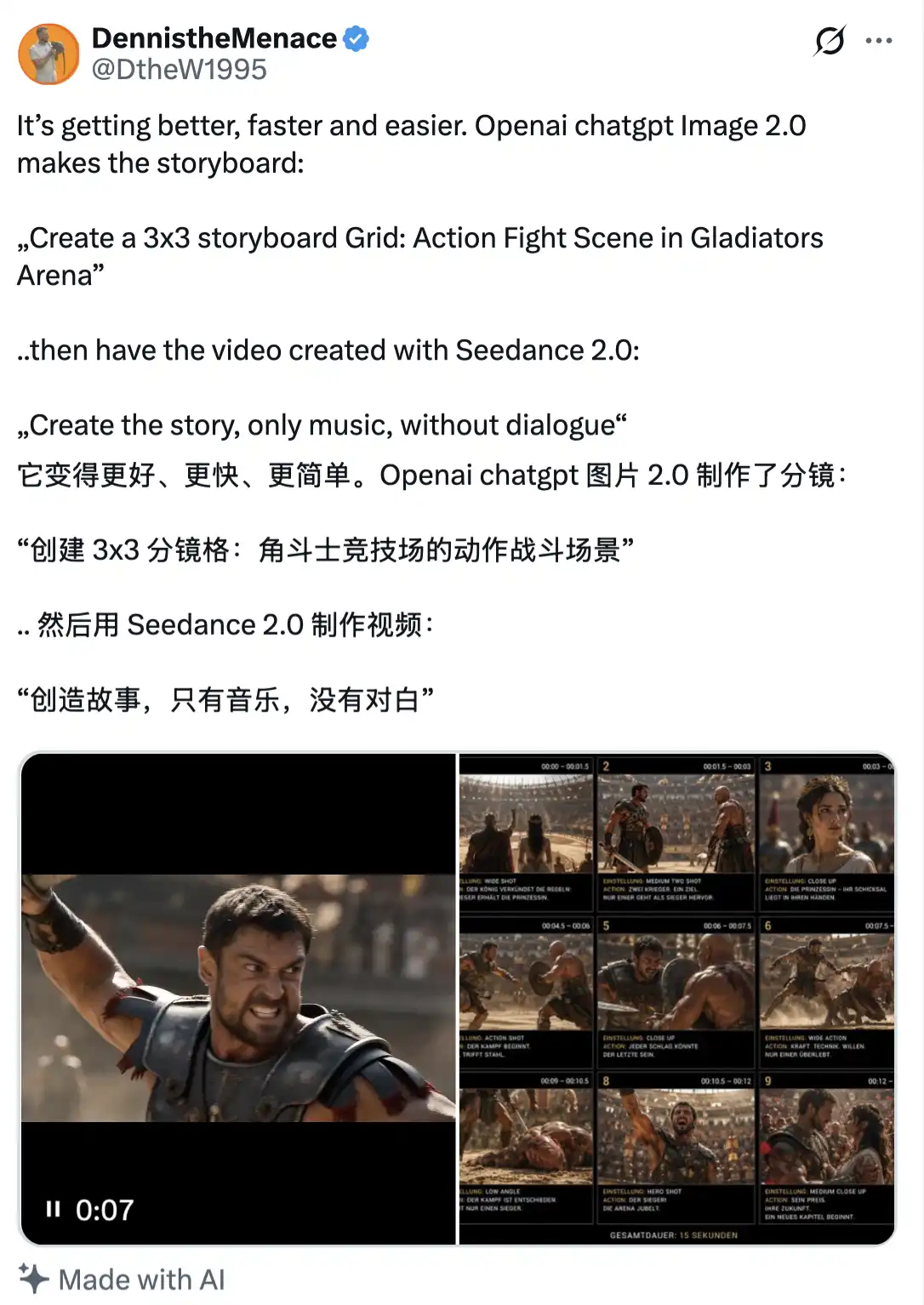
Power users will "direct" it like a director.
2. Character Systems
The real breakthrough is: you can build reusable "character anchor points" and keep the characters from drifting in multiple generations.
Practical applications include:
· Mascots for YouTube channels
· Product characters that can be reused in different marketing campaigns
· Game character designs and development charts
· Reference images for comic book protagonists
You can create your own character (or import an existing one) and then repeatedly call and use it in different scenarios like this.
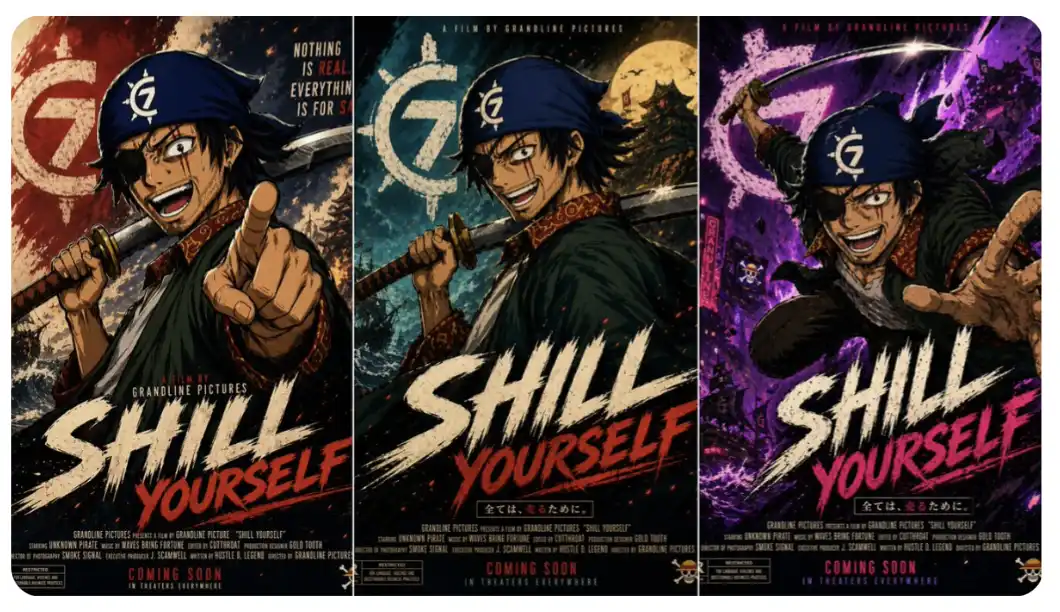
3. Campaigns
In the official demo, OpenAI showcased a Korean hotel brochure, finely typeset edited posters, and complete visual layout designs.
Applied to real-world scenarios, this can cover:
· End-to-end marketing campaigns for product launches
· Brand visual asset libraries
· Social media promotional materials
· Presentation slides and materials
You can even generate a complete brand redesign solution in 90 minutes: 12 variations of posters, 8 sets of social media assets, and 3 packaging design options.
Traditional cost: around £8,000, while the cost of GPT Images 2.0 is far below this number.
Check out this example:
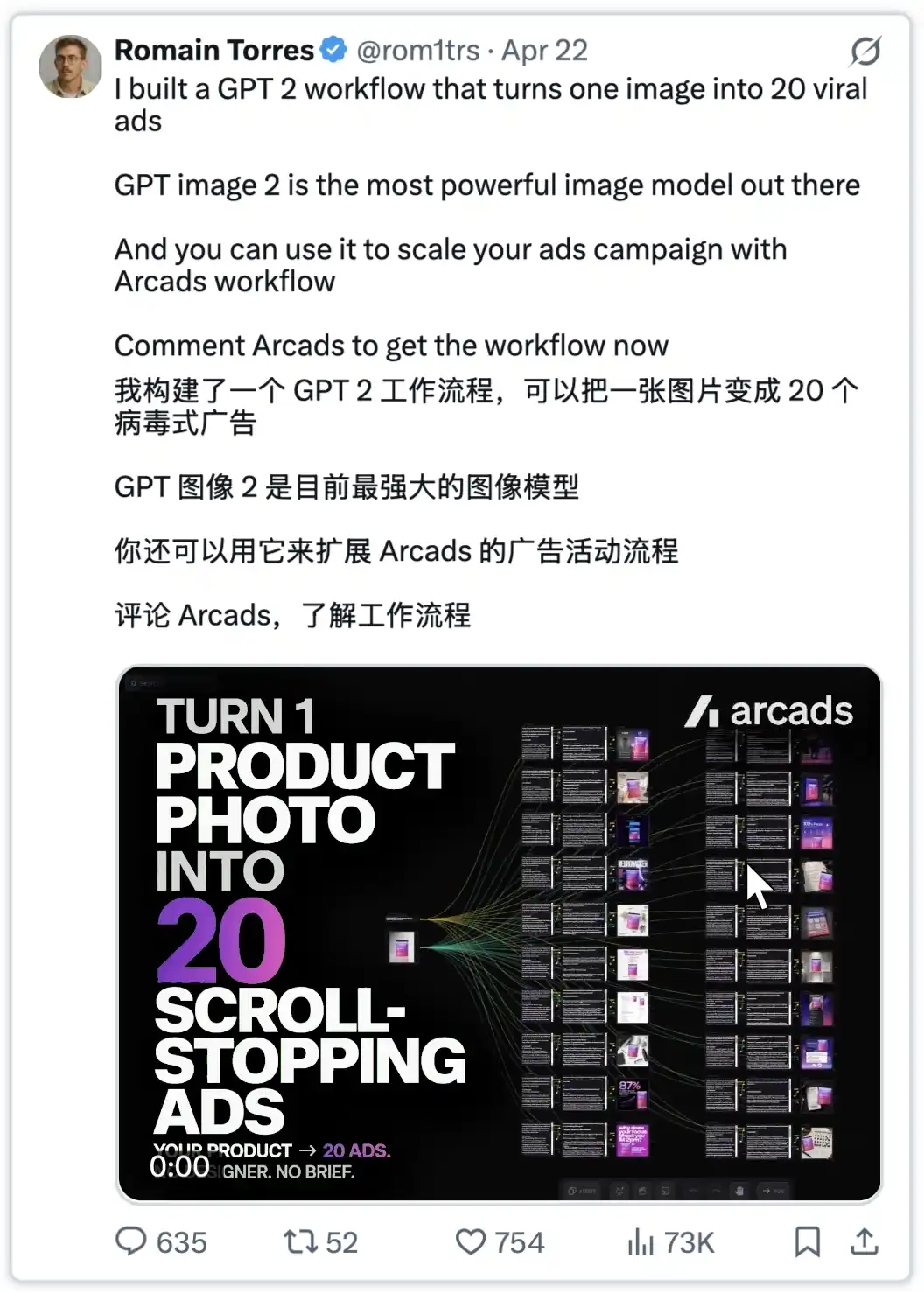
4. Educational Content that Works
Academic posters, concept visualizations, process diagrams, and other content can all be systematically generated. The official "cookbook" suggestion is to treat these tasks as "instructional design."
Common outputs include:
· Step-by-step explainers
·Labeled Process Charts
·Classroom Teaching Materials
·Visual Teaching Guides
5. Product Development
Includes package design, virtual try-on, product photography, collectible design, etc.
The key difference here lies in the "Prompt Method":
· Beginner: "Create a product image"
· Advanced User: "Generate a high-end hero shot, luxurious style, studio lighting, pure white background, product placed at a 3/4 angle"
The difference lies not in the modeling ability, but in the precision and structure of expression.
How to Write Prompt Words
In any case, the above are just some application scenarios. So, the real key question is: How should you write prompt words for GPT Images 2.0?
Let's now get to the core part.
1. Universal Prompt Structure
Goal: [specific deliverable type]
Deliverable: [poster/storyboard/character sheet/mockup]
Scene: [environment and context]
Subject: [main focus elements]
Style: [photorealistic/editorial/anime/flat design]
Composition: [framing/layout/focal points]
Text: [exact words in quotes]
Constraints: [what stays fixed/what changes/what's forbidden]
The purpose of this template is to force you to clarify the requirements.
2. Storyboard Mastery Prompt
Goal: Create 6-panel storyboard page
Story beats:
Panel 1: [opening shot - wide establishing]
Panel 2: [character reaction - medium shot]
Panel 3: [action or discovery - dynamic angle]
Panel 4: [emotional close-up]
Panel 5: [turning point - dramatic moment]
Panel 6: [resolution - final reveal]
Character continuity: Same face, hair, outfit, proportions throughout
Style: Clean anime storyboard with professional panel layout
Constraints: One clear action per panel, minimal dialogue, no background clutter
The result is that the narrative truly starts to “flow,” rather than being a bunch of loosely connected scenes.
3. Character System
Goal: Create a master character reference sheet
Character: [detailed physical description - height, build, distinctive features]
Include: Front view, 3/4 view, side view, expression variations, key poses
Style: [anime/realistic/cartoon - specify consistency level]
Layout: Professional reference sheet with clear labels
Constraints: Consistent proportions, no costume variations, clean background
(Simply upload the character), and in subsequent generated scenes: always refer back to this “master sheet,” only adjusting the pose, scene, or lighting, keeping everything else consistent.
4. Campaigns
Goal: Create [launch poster/social asset/product mockup]
Audience: [specific target demographic]
Message: [core value proposition]
Mood: [luxury/energetic/trustworthy/innovative]
Text (EXACT): "[headline]" and "[subheading]"
Typography: [modern sans-serif/elegant serif/bold display - specify hierarchy]
Constraints: Brand colors only, no extra text, strong visual hierarchy
Key Detail: Highlight the text to be presented in quotes and explicitly request it to be presented "verbatim."
5. Advanced Tactics
Continuity System
A set of role consistency workflow validated by the community:
· Create a master description: Describe only the appearance, excluding scene details
· Name the characters: Such as "alex" or "maya," for easy reference
· Reuse core details: Repeat key appearance features in subsequent prompts
· Separate identity from action: Change posture/scene while keeping the character consistent
Example master description:
"maya, 28 years old, athletic build, shoulder-length dark hair with blue highlights, iconic green eyes, a small scar above the left eyebrow, usually dressed in a fitted black jacket"
Subsequent use:
"maya (refer to master description), sitting at a cafe table, laptop open, morning light ambiance, 3/4 view"
Editing Protocol
Always be clear:
· change only: Parts to be changed
· preserve: Parts to be retained (clearly listed)
· keep same: Elements to remain consistent (lighting/posture/background/color)
Example:
"Only replace the laptop screen with financial charts. Preserve maya's posture, facial expression, lighting, background, and clothing. Keep everything else the same."
Quality Scaling Strategy
· Low quality: Drafts, exploration, concept development
· Medium quality: Social media assets, presentations, internal use
· High quality: Print materials, final deliveries, client projects
FAQs and Immediate Fixes
Issue: Character drifts between different images
Solution: Use a character anchor system + master description + repeat core details
Issue: Text appears but not entirely consistent
Solution: Shorten the text, use quotes, specify formatting, enhance quality settings
Issue: Extensive editing changes
Solution: Use the "change only X" protocol and list the sections that need to remain consistent
Issue: Output appears too generic
Solution: Describe specific details such as material, lighting, and composition, avoiding vague expressions like "make it look better"
Issue: Layout appears cluttered
Solution: Write prompt words like you would in a design brief, clarifying hierarchy, spacing, and layout rules
Winning Mindset
Amateurs ask: "What prompt words should I use?" Professionals ask: "What workflow should I set up to produce the results I need?" The difference lies in: systematic thinking.
How Professional Users Utilize GPT Images 2.0
· Storyboard Engine
· Character Development Tool
· Marketing Material Generator
· Localization Enhancer
· Concept Development Accelerator
It's not about writing better prompt words, it's about building a better system.
The Most Important Point
Stop treating it as an "image generator." Start treating it as a "visual production system."
The true value lies in: translating ideas into deliverable assets—story-driven storyboards, scalable character designs, convertible marketing materials, sellable product images, truly impactful content.
Approach it as a professional collaborator with a clear brief, not a creative slot machine.
Next Step
Choose a delivery type: storyboard, character design, or marketing material. Master one workflow first.
